How to Open SlideBuild
Quick guide to opening and launching SlideBuild in your Google Slides presentation. Find the Extensions menu and access the SlideBuild sidebar.
After installing SlideBuild, you need to know
how to open SlideBuild in your Google Slides presentation.
This guide will show you exactly where to find and launch the add-on.
- Open Your Google Slides Presentation
- Navigate to Extensions Menu
- Launch SlideBuild
- SlideBuild Sidebar Appears
Open Your Google Slides Presentation
Start by opening any Google Slides presentation where you want to generate slides. You can create a new presentation or open an existing one. SlideBuild works in both new and existing presentations.
Navigate to Extensions Menu
In the top menu bar of Google Slides, click on Extensions. This will open a dropdown menu showing all installed add-ons for Google Slides.
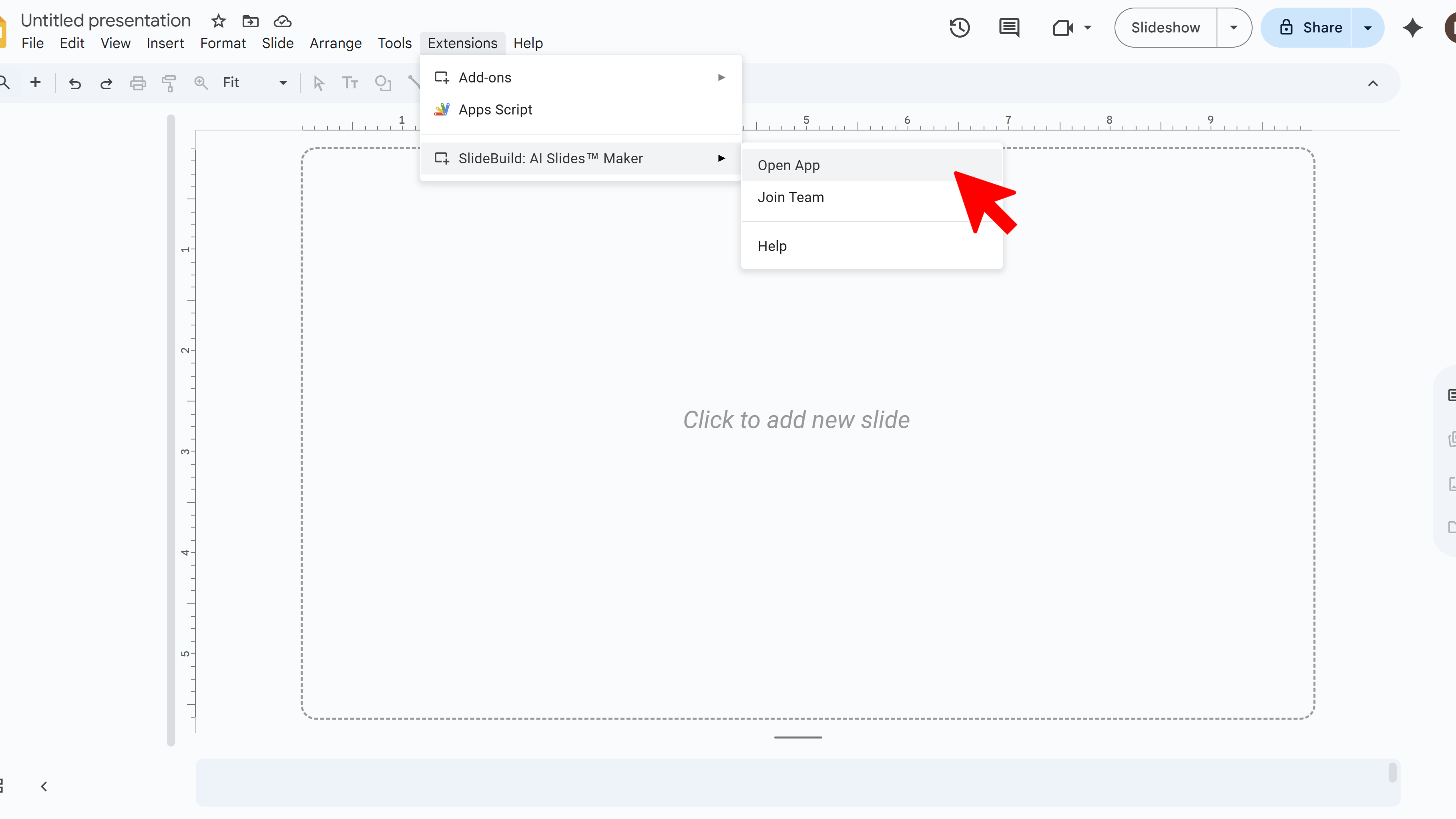
Launch SlideBuild
From the Extensions dropdown, find and click SlideBuild. This launches the add-on and opens its interface in a sidebar on the right side of your screen.
SlideBuild Sidebar Appears
Once launched, the SlideBuild sidebar will appear on the right side of your Google Slides workspace. The integration is seamless, keeping you inside Google Slides while adding advanced design functionality. You're now ready to start generating slides.
Create Slides Faster with SlideBuild

Tips for Opening SlideBuild
- You can keep the SlideBuild sidebar open while working on your presentation
- If you close the sidebar, simply go back to Extensions → SlideBuild to reopen it
- The sidebar position is fixed on the right side and cannot be moved
Common Pitfalls When Opening SlideBuild
- SlideBuild Not in Extensions Menu: Make sure you've installed SlideBuild first. If you just installed it, refresh your browser tab
- Sidebar Won't Load: Check your internet connection. SlideBuild requires an active connection to function
Related Resources
SlideBuild: AI Slides Maker
Create professional Google Slides presentations in minutes using AI. Perfect for business, education, and more.
- AI-powered slide generation
- Customizable templates
- Brand color palettes
- AI-generated images
- One-click slide creation
- Perfect for business and education